執行網路版產品時,畫面顯示「FLEXnet License Manager」異常的錯誤訊息,如何排除?
發表於 : 2017年 5月 26日, 16:53
執行網路版產品時,畫面顯示「FLEXnet License Manager」異常的錯誤訊息
The Networking Software (WINSOCK) could not obtain the IP address of the computer "ComputerName"
This could be due to "ComputerName" not being a valid computer name,or the DNS Name Resolution Service is not working or not configured properly.
You may need to include "ComputerName" in your "hosts" file...
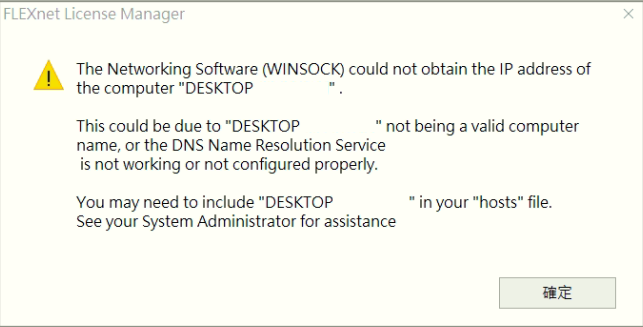
一般情況下,用戶端找不到授權主機應該會出現「License Finder」視窗,問題與解決方法請點我
而此問題經過檢查,最後確認是SERVER端授權異常,導致用戶端出現此畫面
檢查與排除流程:
1. 檢查LMTOOLS \ Server Status --> 異常
2. 重新啟動服務 --> 失敗
比較奇怪的是:在Windows的服務清單找不到LMTOOLS中記錄的ServiceName,所以無法在Windows服務視窗手動重啟服務
3. 最後在LMTOOLS重建並啟動服務--問題排除
The Networking Software (WINSOCK) could not obtain the IP address of the computer "ComputerName"
This could be due to "ComputerName" not being a valid computer name,or the DNS Name Resolution Service is not working or not configured properly.
You may need to include "ComputerName" in your "hosts" file...
一般情況下,用戶端找不到授權主機應該會出現「License Finder」視窗,問題與解決方法請點我
而此問題經過檢查,最後確認是SERVER端授權異常,導致用戶端出現此畫面
檢查與排除流程:
1. 檢查LMTOOLS \ Server Status --> 異常
2. 重新啟動服務 --> 失敗
比較奇怪的是:在Windows的服務清單找不到LMTOOLS中記錄的ServiceName,所以無法在Windows服務視窗手動重啟服務
3. 最後在LMTOOLS重建並啟動服務--問題排除