第 1 頁 (共 1 頁)
雙擊文字卻無法編輯,已修改變數但仍無法解決
發表於 : 2007年 4月 26日, 23:09
由 admin
以前滑鼠快按2下可以直接編輯文字,但現在卻無法進入編輯模式
輸入”dblclkedit”確定是”on”,為何快按2下還是無法直接編輯文字??
我的CAD是2007版的
Re: 文字編輯變數改過也無效
發表於 : 2007年 4月 27日, 02:02
由 admin
Solution
This may occur if Noun/Verb Selection is turned off. To turn this setting on, do one of the following:
1. Set the PICKFIRST variable to 1.
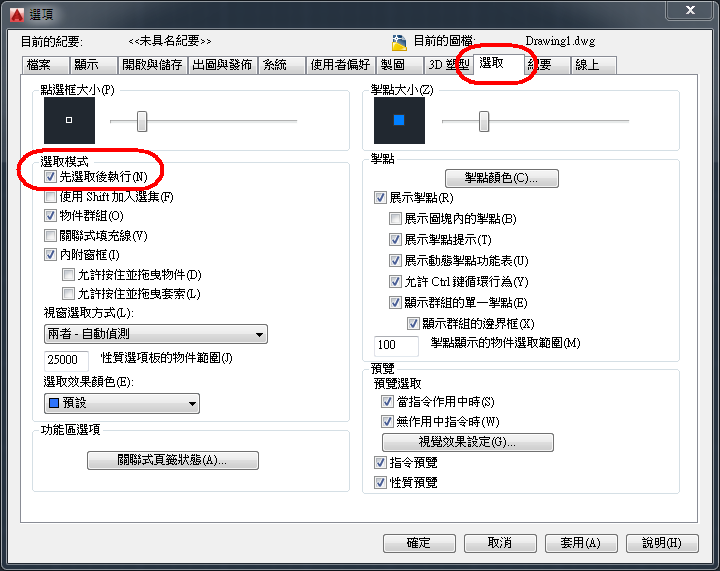
2. In the Options dialog box, click the Selection tab and select the Noun/Verb Selection check box.
解決方案:請選其中一種方式即可解決您的問題
1. 指令區輸入 PICKFIRST ,並確認設定值為1。
2. 在『工具』-『選項』頁籤中的選取模式,勾選『先選取後執行』。
此方案也可以解決在點選物件後,物件性質工具列上未反映出物件所在的物件資訊(例如:圖層)的問題。
[img]
http://web.ctc.com.tw/Products/Acad/Noun_Verb.png[/img]
Re: 文字編輯變數改過也無效
發表於 : 2007年 5月 6日, 22:57
由 admin
按照你所說的方法去試,結果還是不行。
不過還是很謝謝你的解答。
Re: 文字編輯變數改過也無效
發表於 : 2007年 5月 7日, 09:56
由 admin
還有個地方要注意的
進入CUI,有個 "按兩下動作" 的項目
請檢查與文字有關的巨集資料是否正確
例如:
多行文字:^C^C_mtedit
文字:^C^C_ddedit
Re: 文字編輯變數改過也無效
發表於 : 2007年 6月 27日, 09:55
由 admin
按照你的方法去查詢巨集資料也是正確的,還是沒辦法快按2下直接編輯文字
Re: 文字編輯變數改過也無效
發表於 : 2007年 6月 29日, 00:05
由 admin
指令區輸入 dblclkedit , 確認是否為1
指令區輸入 pickfirst , 確認是否為1
目前已知的解決方式就是上面的方法
可能要請您與經銷商或原廠聯繫看看
Autodesk技術客服電話:02-25062582
服務時間 星期一到星期五(例假日除外) 9am-6pm
Autodesk客服信箱:
autodesk@synnex.com.tw